Television continues to evolve. What once was simply a box for watching channels has turned into a full entertainment hub in many homes. Today’s choices can feel confusing for buyers. Two terms that come up again and again are Android TV and Smart TV. Recent reviews and expert articles suggest that understanding the difference between these platforms can help shoppers pick the right television for their needs and budget.
This guide explains in clear, everyday language what Android TV and Smart TV mean, how they compare, and which one might suit different types of users. It also looks at features, content options, price ranges, and common questions people ask before buying a new TV. By the end, readers should feel confident picking between an Android TV and a Smart TV.
What Is Android TV?
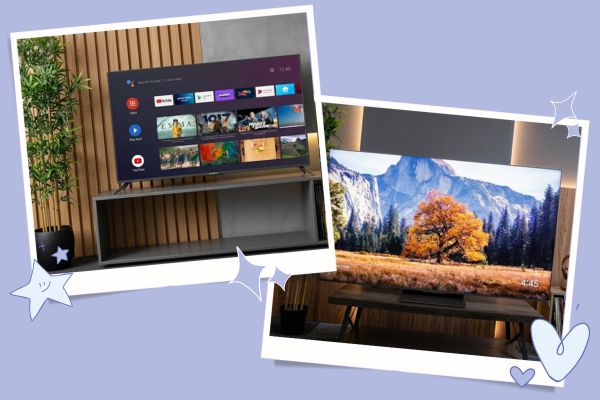
Android TV is a software platform developed by Google that runs on television sets and streaming devices. It is designed to provide a familiar Android experience similar to what many people see on smartphones and tablets.
At its core, Android TV gives access to the Google Play Store for TV apps. This means users can install Netflix, YouTube, Disney+, Spotify, and many more apps directly on their TV. Many Android TVs also have Google Assistant built in. Users can search for shows, adjust settings, or ask questions by using voice commands.
Android TV is used by multiple brands, including Sony, TCL, and Hisense. Some users also access Android TV on standalone streaming sticks and boxes that attach to any television.
What Is Smart TV?
Smart TV is a broad term that refers to any television with built-in internet connectivity and app support. These TVs let users stream video, browse content, and access services without needing an external box.
Smart TV platforms vary widely by brand. Samsung uses its own Tizen platform. LG uses webOS. Other manufacturers offer their own versions or partner with platforms like Roku. Each system comes with its own user interface and set of available apps.
Unlike Android TV, Smart TV is not tied to one operating system. It is a generic label for any TV that connects to the internet and runs apps without needing extra hardware.
How Android TV And Smart TV Differ
Understanding the differences between these platforms helps shoppers choose the best option.
User Interface And Experience
Android TV offers a consistent experience across brands that use it. The menu layout, search features, and app store look and work similarly, no matter the TV maker. Users familiar with Android on phones often find Android TV intuitive.
Smart TV interfaces, on the other hand, differ by brand. A Samsung Smart TV may feel very different from an LG Smart TV. Some brands put entertainment apps front and center, while others emphasize live TV, recommendations, or their own ecosystems.
App Availability
Android TV taps into the Google Play Store, which includes a wide range of apps optimized for the TV screen. Many popular streaming services are available, and developers continue to make more.
Smart TV platforms can vary in app selection. Major services are usually available, but smaller or region-specific apps may not be. Availability often depends on the brand’s partnerships.
Voice Control
Many Android TVs integrate Google Assistant. This allows voice search, app launch, and even smart home control with simple spoken commands. Android TV remotes often include a dedicated microphone button.
Smart TV voice features depend on the brand. Some models offer built-in systems like Samsung’s Bixby or LG’s ThinQ. Others support voice assistants through connected devices such as Amazon Alexa.
Updates And Longevity
Android TV benefits from Google’s regular updates. These updates can bring new features, improved security, and wider app support. Brands that commit to long-term update support make Android TV a strong choice for future-proofing a TV.
Smart TV systems may or may not receive frequent updates. Brands differ in how often they update software and for how many years. Some older Smart TV models stop receiving updates after a few years, which can limit access to new apps or features.
Popular Brands And Models
Both Android TV and Smart TV options come from major brands. Here are some examples.
Android TV Brands
- Sony offers Android TVs with premium picture quality and strong performance.
- TCL provides budget-friendly Android TVs with good app support.
- Hisense also uses Android TV in many models with competitive pricing.
Standalone Android TV devices include streaming sticks and boxes that work with any television.
Smart TV Platforms
- Samsung Smart TVs use the Tizen platform, known for smooth performance and smart features.
- LG Smart TVs operate on webOS, a clean and user-friendly interface.
- Roku TV appears on brands like Hisense and TCL and offers a simple, channel-focused experience.
- Vizio SmartCast combines streaming apps with casting from phones and tablets.
Each of these platforms has strengths and quirks, which buyers should consider when choosing a TV.
Picture Quality And Performance
Choosing a TV is not just about the software. Picture quality, panel type, and refresh rate also matter.
Resolution And Panels
Modern TVs typically offer 4K resolution, which delivers crisp detail suitable for streaming and gaming. Some models also support HDR (High Dynamic Range), which enhances contrast and color depth.
Panel types include LED, OLED, and QLED. OLED panels provide deep black levels and rich colors. QLED panels aim for bright, vibrant images. LED panels are often more affordable but vary in quality by model.
Refresh Rate
Refresh rate indicates how often the picture refreshes per second. A higher refresh rate, like 120Hz, looks smoother during fast action scenes or gaming. Lower refresh rates are common in basic models and may suit casual viewing.
Android TV and Smart TV platforms can appear on TVs with any of these panel types. The choice between platforms should also consider picture and performance features.
Content And Compatibility
Modern TVs connect to many types of content beyond traditional broadcasting.
Streaming Services
Both Android TV and Smart TV systems support major streaming services such as Netflix, YouTube, Hulu, Disney+, and Amazon Prime Video. Android TV’s access to the Google Play Store can make downloading and updating apps easier.
Casting And Screen Sharing
Many Android TVs support Chromecast built-in, allowing users to cast content from phones and tablets directly to the TV. Smart TV platforms may offer their own casting technologies or rely on features like AirPlay to connect Apple devices.
Game Streaming
Android TV supports popular game streaming services, and some models include access to cloud gaming. Smart TVs may also support streaming games, but availability depends on the stand-alone platform and partnerships.
Audio And Smart Home Integration
Audio Features
Sound quality varies by model. Some TVs include enhanced audio systems or support for soundbars and surround sound. Android TV and Smart TV both work with external audio systems through HDMI, Bluetooth, or optical connections.
Smart Home Compatibility
Android TV can integrate with Google Home ecosystems. Voice commands can control smart lights, thermostats, and connected devices using the Assistant.
Smart TV platforms may integrate with other ecosystems. For example, Samsung’s SmartThings works with Samsung TVs. Brands may also support Amazon Alexa or Apple HomeKit through connected devices.
Price Comparison
Prices for Android TVs and Smart TVs vary based on size, panel type, brand, and features. Below is a comparison of typical ranges.
| Feature | Android TV Models | Smart TV Models |
|---|---|---|
| Entry-Level | Moderate | Low to Moderate |
| Mid-Range | Moderate | Moderate |
| High-End | High | High |
| App Selection | Wide | Varies by Brand |
| Updates | Regular | Varies by Brand |
| Voice Control | Often Built-In | Depends on Brand |
Android TV models tend to be competitive, especially when bundled with strong app support and regular updates. Smart TV options can be more affordable, especially in entry-level segments.
Tips For Choosing
Determining the right TV involves more than picking a name on the box.
Decide What You Watch Most
If streaming and app flexibility matter most, consider a platform with strong support for those services. Android TV excels in providing a wide app range with Google Play integration.
Think About Future Needs
Software updates and app availability matter over the longer term. Android TV is generally backed by a larger app ecosystem and more frequent updates.

Balance Budget And Features
Smart TV platforms may offer good performance at lower prices. Android TV can provide more features, but sometimes at a higher cost. Balance what matters most for your viewing habits.
Try The Interface
If possible, visit a store and try both interfaces. Which system feels easier to navigate can make a difference in day-to-day use.
Frequently Asked Questions
What Is Better, Android TV Or Smart TV?
Neither is universally better. The right choice depends on what features and experiences matter most to the viewer.
Does Android TV Need A Separate Streaming Device?
No. Many televisions come with Android TV built in. However, standalone Android TV devices can add the platform to older TVs.
Can Smart TV Apps Be Updated?
Yes, but frequency and selection depend on the brand and how often the manufacturer supports software updates.
Is Google Assistant Available On All Android TVs?
Most Android TV models include Google Assistant, but availability can vary by region and manufacturer.
Do Both Platforms Support 4K Streaming?
Yes, both Android TV and Smart TV platforms support 4K streaming if the TV hardware does.
Which TV Platform Is Right For You?
Choosing between Android TV and Smart TV comes down to personal priorities and budget. Android TV offers a consistent and app-rich experience with strong voice control and future update potential. Smart TV systems vary from brand to brand, with some offering smooth, simple interfaces and creative features tailored to specific audiences.
Understanding how each platform works helps buyers make a choice that fits their entertainment needs. Whether settling in to watch the latest shows, streaming videos from multiple services, or connecting devices throughout the home, the right TV can make the experience better.